Category: Wearables

  • Rumor: Next-gen Vision Pro could use Dual Knit Band headband

    Rumor: Next-gen Vision Pro could use Dual Knit Band headband

    The next-gen Apple Vision Pro could be somewhat more comfortable to wear.

    Beyond being powered by an updated chip, a backend code reference discovered by MacRumors noted a “Dual Knit Band,” which is not a band that exists at the current time. The Apple Vision Pro comes with a Solo Knit Band and a Dual Loop Band, but no Dual Knit Band.

    Given the name, it’s thought that the new band could be a cross between Apple’s two existing bands, and use the same material as the current Solo Knit Band, but with a more supportive fit, given the second band. A text description of the Dual Knit Band suggests that there will be an upper band that spans the top of the head and another band that fits behind the head.

    This comes at a time when some current Apple Vision Pro owners have made custom adjustments to use two Solo Knit Bands to provide extra support at the top of the head.

    Back in July, Bloomberg’s Mark Gurman said that the refreshed Vision Pro could include a new strap that would make it easier to wear the headset for long periods of time.

    The Vision Pro weighs between 21.2 and 22.9 ounces, putting considerable strain on the head when it’s worn for long periods of time. Some users find the weight of the device and the poor distribution of the Solo Knit Band to cause discomfort. The Dual Loop Band removes some of the weight from the face, but because it doesn’t have the same knit design as the Solo Knit Band, it is less comfortable.

    Apple is rumored to have a refreshed Vision Pro headset before the end of 2025. The unit is expected to feature the new M5 chip, although Apple may not make any other significant updates to the device.

    Stay tuned for additional details as they become available.
    Via MacRumors and Bloomberg

  • iFixit posts teardown report of AirPods Pro 3 earbuds, offers 0 out of 10 repairability score

    iFixit posts teardown report of AirPods Pro 3 earbuds, offers 0 out of 10 repairability score

    If you were hoping to disassemble and repair Apple’s newly-released AirPods Pro 3 wireless earbuds on your own, it’s time to find another dream.

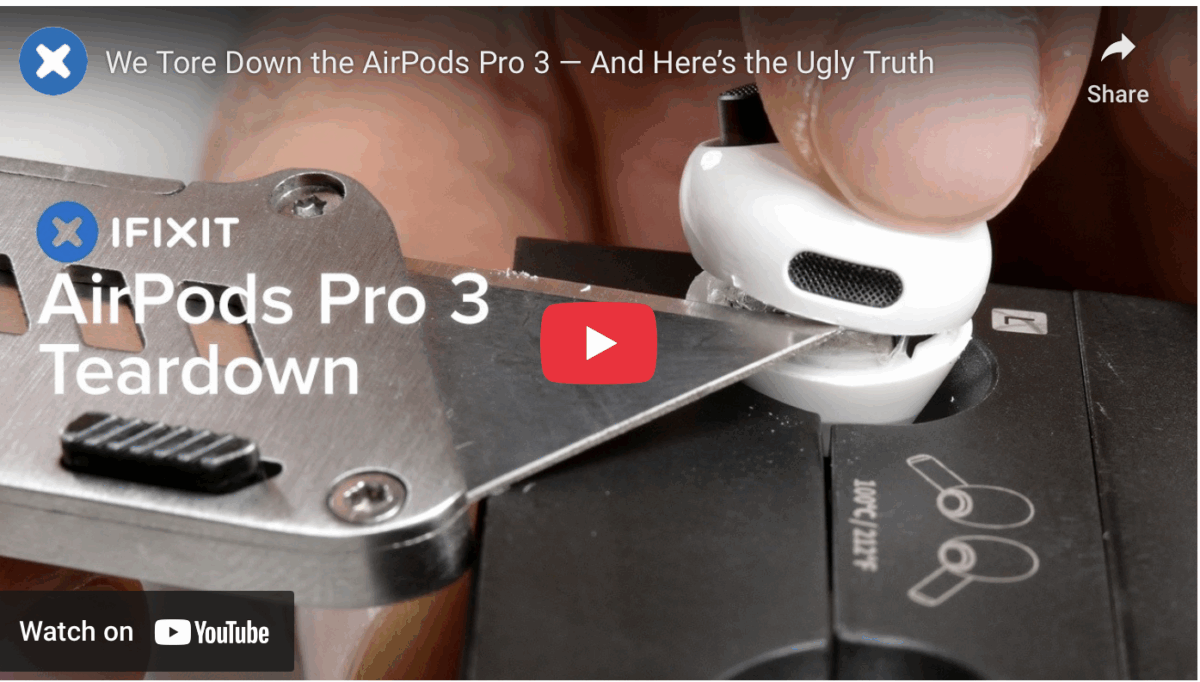
    The cool cats at iFixit on Wednesday published a full teardown of the AirPods Pro 3 units, noting an extremely difficult-to-open design as well as a slew of fragile new components.

    The new AirPods Pro 3, which feature a new foam-infused tip, also feature a small layer of foam at the top of the earbud where it meets the ear.

    The AirPods have a 0.221 Wh battery cell inside, while the case has a single 1.334 Wh battery. The AirPods Pro 2 had two battery cells inside the case, and the change explains why we’re down to 24 hours of battery life from the case instead of 30 hours like the AirPods Pro 2.

    As for the internals, the new case uses fewer rare earth magnets inside, albeit the magnets have been relocated to different locations to ensure that MagSafe and Qi 2 charging still work as expected.

    Whatever your technical aspirations with the new AirPods Pro 3 units are, Apple didn’t design them to be repaired, and iFixit stated that they had to essentially destroy the units to open them.

    Since the first version of the AirPods was released, Apple has included a battery that is sealed shut with glue. This hasn’t changed with the AirPods Pro 3, and iFixit noted that many repair shops won’t even attempt to do it. The AirPods Pro Charging Case has the same glued-in battery.

    The unit offers no way to attempt a battery repair without blemishing the plastic of the earbuds and the casing, which has to be pried open. Heat needs to be used to melt the adhesive, and there’s no easy way to disconnect the flex cable that’s inside each earbud. Given the need for specialized equipment as well as the inability to repair the earbuds and the case without causing damage, the ‌AirPods Pro 3‌ earned a 0 out of 10 repairability score from iFixit.

    In short, you’re going to have to take them to Apple should you need the batteries swapped out or look into a replacement unit.

    Via MacRumors and iFixit

  • North Dakota joins growing list of U.S. states, approves digital IDs

    North Dakota joins growing list of U.S. states, approves digital IDs

    In a slow-but-sure process, Apple has expanded the list of U.S. states and territories that support IDs in Apple Wallet. Following the addition of Montana last month, North Dakota is now the latest to join.

    The digital IDs can be used at TSA checkpoints in certain airports and at select businesses and venues. Given the slow pace of the rollout, many states advise people to keep their physical IDs on hand.

    The updated list of US states and territories that support digital IDs in Apple Wallet is as follows:

    • Arizona
    • California
    • Colorado
    • Georgia
    • Hawaii
    • Iowa
    • Maryland
    • Montana
    • New Mexico
    • North Dakota
    • Ohio
    • Puerto Rico

    Be sure to read up on the rules per your state and we’ll have additional details as they become available.

    Via 9to5Mac

  • Some iPhone 17, iPhone 17 Pro, iPhone 17 Pro Max, and iPhone Air owners cite Wi-Fi connectivity issues

    Some iPhone 17, iPhone 17 Pro, iPhone 17 Pro Max, and iPhone Air owners cite Wi-Fi connectivity issues

    There’s a reason iOS patches come out.

    A number of iPhone 17 users have commented that their new handsets experience sporadic Wi-Fi connectivity errors. At present, hundreds of comments have been posted on the MacRumors Forums, Reddit, and the Apple Support Community over the past few days citing the issue with the iPhone 17, iPhone 17 Pro, iPhone 17 Pro Max, and iPhone Air units. It is unclear how widespread the problem is.

    Specifically, affected users said Wi-Fi briefly disconnects and then reconnects after they unlock the iPhone. And since Apple’s CarPlay system in vehicles relies on a Wi-Fi connection, the issue can result in CarPlay disconnecting too.

    A number of users have stated that the issue occurs while they’re wearing an Apple Watch that is paired and unlocked, although it’s unclear if this is a contributing factor.

    It is unclear if this is a hardware or software problem, but Apple is often able to fix these sorts of issues with a software update. iOS 26.0.1 is coming soon, but it is unclear if Apple will have identified and implemented a fix in time for that version.

    Each of the new iPhone models arrives equipped with Apple’s first-ever custom-designed N1 chip for Wi-Fi 7, Bluetooth 6, and Thread connectivity, whereas previous iPhone models rely on a Broadcom chip for wireless networking.

    In its press releases for the new iPhones, Apple said the N1 chip also improves the performance and reliability of features like Personal Hotspot and AirDrop.

    If you’ve seen these errors on your end with your new iPhone 17, please let us know in the comments.

    Via MacRumors, Reddit, and discussions.apple.com

  • Apple posts “Awe Dropping” media event for streaming

    Apple posts “Awe Dropping” media event for streaming

    If you didn’t have a chance to watch Apple’s “Awe Dropping” media event on Tuesday, wherein the iPhone 17, iPhone 17 Pro, iPhone 17 Pro Max, iPhone 17 Air, Apple Watch Series 11, Apple Watch Ultra 3, and other goodies were announced, Apple has posted the full stream to YouTube.

    Here you go, take a gander, and please let us know what you think in the comments:

    Stay tuned for additionald details as they become available.

    Via YouTube