Category: Take Apart

  • Early drop tests indicate iPhone 15 Pro’s rounded titanium band may be less durable than the iPhone 14 Pro’s design

    Early drop tests indicate iPhone 15 Pro’s rounded titanium band may be less durable than the iPhone 14 Pro’s design

    The new iPhones have begun to emerge, as have efforts to damage and/or destroy them to see just how durable the new hardware is.

    Flying to Australia, AppleTrack’s Sam Kohl submitted the first iPhone 15 drop tests via YouTube. Based on the video, it appears that Apple’s nifty new rounded titanium edges are not better for drop test durability than the remarkably enduring iPhone 14 Pro design. In the past, the flat stainless band on the iPhone 14 was able to absorb much of the impact. This doesn’t seem to be the case with the iPhone 15 Pro, which seemed to cause the impact to spread into the front and back glass, causing spiderwebbing cracks.

    Comparing the titanium and stainless steel edges directly, the stainless steel band of the 14 Pro is seemingly quicker to show dings and scratches. Still, the structural integrity helps the phone fare better overall.

    Since a picture’s worth a thousand words, here’s the drop test as it took place:

    Granted, this kind of testing tends to be notoriously unscientific, and will require repeat tests under controlled circumstances. Still, if you’ve snagged an iPhone 15 Pro, it never hurts to look into a good case for it, enjoy your new smartphone, and please be careful with it.

    Via 9to5Mac and AppleTrack

  • Apple expands Self Service Repair Program to support more devices across additional countries

    Apple expands Self Service Repair Program to support more devices across additional countries

    If you’re a fan of Apple’s Self Service Repair Program, you’re going to like this.

    Apple has announced that the company is updating its software tools so repairers don’t have to call to register parts.

    Apple has stated that “over the past three years,” it has “nearly doubled the number of service locations with access to genuine Apple parts and tools. Its formal Self Service Repair program only launched 14 months ago. Since its launch, Apple has steadily expanded the program to include more iPhones and Macs, as well as begun offering the program to additional countries.

    It has announced that it is expanding its program to include repair options for:

    • The iPhone 14 lineup
    • 13-inch MacBook Air M2
    • MacBook Pro models with M2 Pro
    • MacBook Pro models with M2 Max
    • Mac desktops with M1 (in specific countries)
    • True Depth camera for iPhone 12 and iPhone 13 lineups
    • Top speaker for iPhone 12 and iPhone 13 lineups

    Apple has also stated that the True Depth camera, speaker, and M1 desktop Mac options will be available at launch in the US, Belgium, France, Germany, Italy, Poland, Spain, Sweden, and the UK.

    It’s unknown as to whether this includes Apple’s newly-eligible devices, though it’s notable that the list does not yet include the new 15-inch MacBook Air notebook.

    Apple has offered the following comment as to its new System Configuration process:

    “Apple will also make the System Configuration process used for iPhone repairs, such as displays, batteries, and cameras, even easier to use. System Configuration is a post-repair software tool that ensures repairs with genuine Apple parts — designed and tested to internationally recognized standards — were completed correctly, and the parts are working properly.”

    One key improvement to System Configuration is that users can run the app without having to contact Self Service Repair support. Although, Apple notes that “the team will still be available to assist as needed.”

    This marks a significant change to the program since its launch. Rather than repairs requiring a final step to be performed by this Apple support team, users “can now initiate System Configuration by placing their devices into Diagnostics mode and following onscreen prompts.”

    At present, Apple’s Self Service Repair for iPhones extends to the following components:

    • Batteries
    • Bottom speaker
    • Camera
    • Display
    • SIM Tray
    • Taptic Engine

    In each case, Apple sells replacement parts and rents out the tools in which to use them. It also requires that users return the faulty parts to Apple.

    It’s also possible to buy only specific parts, as opposed to a bundle. For instance, two security screws can be bought for 20 cents. Specific tools can also be rented from Apple for seven days, this amount usually retailing for $50.

    Stay tuned for additional details as they become available.

    Via AppleInsider and Apple

  • iFixit publishes 15-inch MacBook Air teardown, highlights upgraded speaker system, larger battery

    iFixit publishes 15-inch MacBook Air teardown, highlights upgraded speaker system, larger battery

    Apple put some interesting stuff in its new 15-inch MacBook Air notebook.

    According to the cool cats at iFixit, who completed their usual reardown of the new hardware and posted video of the process, the 15-inch MacBook Air has a similar internal design as the 13-inch model, with the only notable difference being two extra speakers.

    “The new 15-inch MacBook Air also features a phenomenal new six-speaker sound system with two tweeters and two sets of force-cancelling woofers,” said Apple. “The new speakers deliver twice the bass depth for fuller sound, and Spatial Audio with support for Dolby Atmos provides immersive experiences whether listening to music or watching movies.”

    The teardown also revealed a larger battery, although Apple has stated that the 15-inch model’s battery life is equal to the 13-inch model. As with the 13-inch model, the battery cells have adhesive pull tabs for easier removal, but the battery can only be accessed after several other components are disassembled.

    Other components inside the notebook include MacBook Air’s logic board with the M2 chip and a single NAND chip for the 256GB model, which can result in slower SSD read and write speeds compared to 512GB, 1TB, or 2TB models.

    iFixit rated the new MacBook Air as very difficult to repair, and cited that neither the unit’s RAM or storage can be upgraded after purchase.

    If you’ve snagged the new 15-inch MacBook Air, please let us know about your experience in the comments.

    Via MacRumors and iFixit

  • ChargerLAB posts teardown video of Apple’s new 70W GaN USB-C charger

    ChargerLAB posts teardown video of Apple’s new 70W GaN USB-C charger

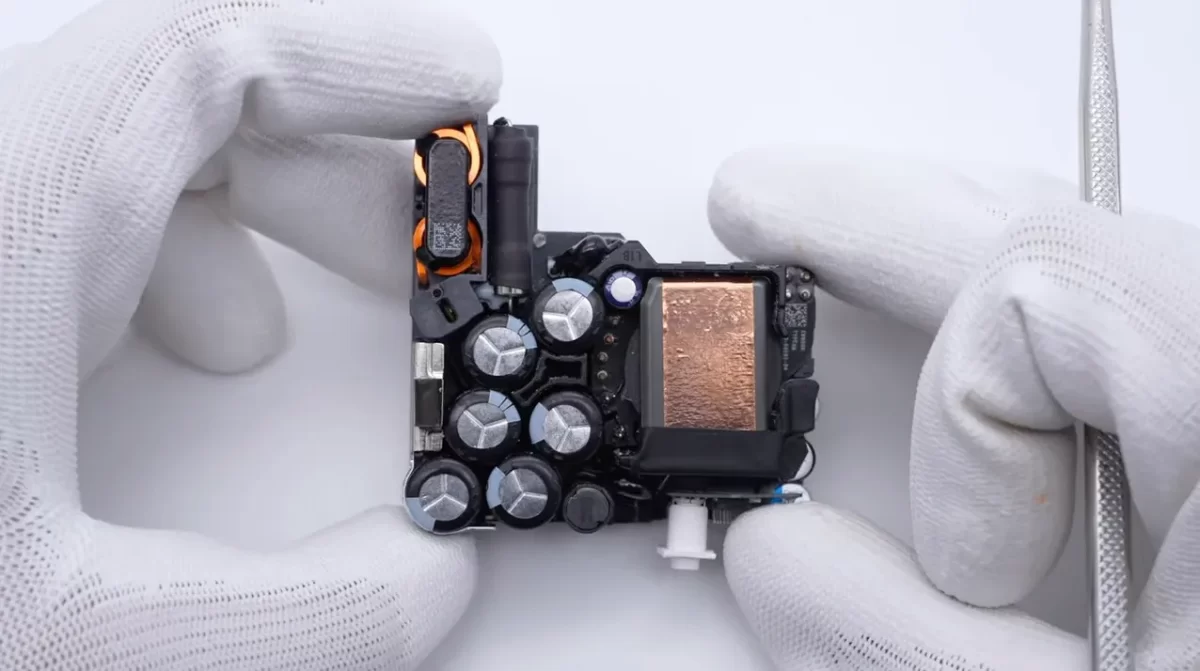
    Alongside its new 15-inch MacBook Air, Apple has released a slightly more powerful and more compact power adapter with its slim and powerful notebook. As such, the cool cats at ChargerLAB have released a teardown video of the new power adapter, wherein they looked to check out the inside and also compare the dimensions against the 67W version.

    The 70W is the second GaN charger from Apple after the 140W model and thanks to the tech, the 70W is smaller in size than the 67W predecessor (dimensions of 65 x 65 x 28.5 mm).

    The video focuses on all the components and layout of the 70W charger as ChargerLAB reveals the capacitors, heat sink, input fuse, transformer, and more.

    As always, please let us know what you make of the new hardware in the comments.

    Via 9to5Mac and ChargerLAB

  • Apple repeats NAND SSD slowdown issue with 256GB drive aboard the $1,299 15-inch MacBook Air

    Apple repeats NAND SSD slowdown issue with 256GB drive aboard the $1,299 15-inch MacBook Air

    Apple may have made the same snafu with its base model SSD with its new 15-inch MacBook Air that it made with the 13-inch version of the notebook.

    The SSD, which features a single 256GB NAND chip, offers slower SSD read and write speeds when compared to the other models with more storage available.

    The issue was noted by YouTuber Max Tech, who published his benchmark tests and pointed out a 30 percent to 50 percent reduction in SSD speeds when compared with the M1 MacBook Air, which offers two NAND chips of 128GB each.

    The slower read and write speeds are present on the Mac mini, 13-inch MacBook Air, 13-inch MacBook Pro, and now the 15-inch MacBook Air—all of them with the entry-level M2 chip. While the comparison is easier to spot with another machine side to side, the everyday user won’t feel the difference.

    The single NAND chip with a 256GB capacity offers slower speeds transferring data to an external hard drive. The drive might also offers slower speeds for your Mac when the computer is maxed out, as Apple uses the SSD space as virtual memory when the physical RAM is being completely used.

    Users can avoid this slowdown by purchasing the next configuration, and while the base configuration’s $1,299 price point is tempting, the difference in speeds might compel customers towards a model with a larger drive.

    The new MacBook can feature up to 24GB of RAM and 2TB of storage. It’s available on Apple’s website, local Apple Stores, and premium resellers.

    Stay tuned for additional details as they become available.

    Via Boy Genius Report and Max Tech