Tag: alcohol

  • Profile of the Gourmet Haus Staudt beer hall recalls the chaotic days of the 2010 iPhone 4 prototype leak and the chaos that ensued

    It was probably Apple’s most famous security breach in the company’s 47-year history, and it was at least partially fueled by alcohol.

    On Thursday, March 18, 2010, a drunk Apple software engineer named Gray Powell left an iPhone 4 prototype on a barstool inside Redwood City’s Gourmet Haus Staudt beer hall. This seemingly innocuous act would eventually result in a $5,000 cash purchase of stolen property, a police raid and accusations of extortion from then-CEO Steve Jobs.

    It would also set off a complete media frenzy that would bring the world’s attention to the bar, which was located only a mere 20 miles from Apple’s Cupertino headquarters.

    A terrific SFGate article details the story of how the Apple engineer accidentally left the iPhone 4 prototype at the bar, how owner Brian Hogan mistook it for an iPhone 3GS, how Hogan tried to get it back to its owner, and the chaotic frenzy that took place when people realized what the device was, how its hardware was different from previous generations, what the prototype might be worth, and what the device indicated as to the future of Apple’s hardware (especially its antenna module).

    The story took its next turn when Gizmodo acquired the prototype, Apple’s legal team became involved in efforts to get it back, and the question of the first amendment versus intellectual property came into play.

    Click the link below, give it a read, and please let us know what you think in the comments.

    Via SFGATE, Gizmodo, The New York Times, CNET, and Business Insider
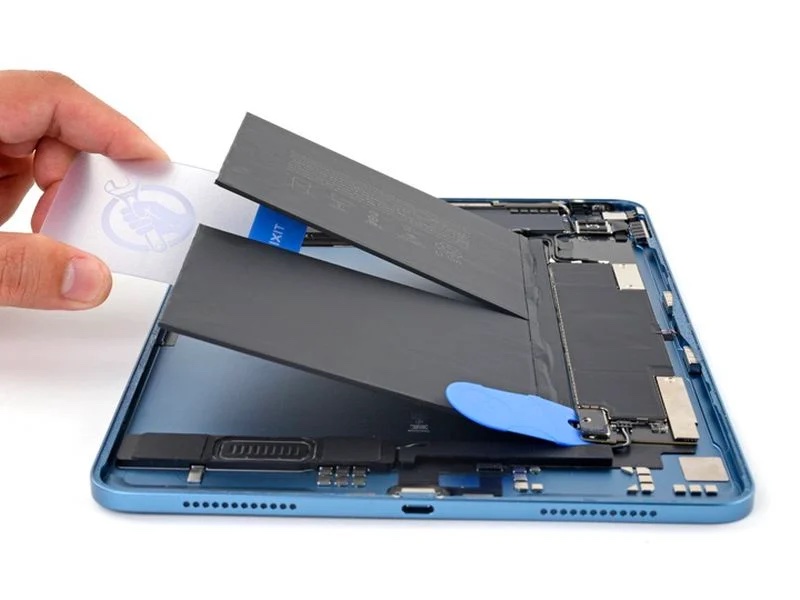
  • iFixit notes easy-pull battery removal tabs in fifth-generation iPad Air tablets

    iFixit notes easy-pull battery removal tabs in fifth-generation iPad Air tablets

    Once again, the super cool cats at iFixit have dug into Apple’s newest hardware, this time tackling the fifth-generation iPad Air, which features new improvements such as an M1 chip, 5G support for cellular models, an upgraded front camera with Center Stage support, and up to a 2x faster USB-C port for data transfer.

    The report also noted that the new iPad Air’s battery cells incorporate stretch-release pull tabs on the underside for easier removal. In comparison, previous iPad Air models have completely glued-in battery cells that are more difficult to remove, with technicians commonly using a solvent like isopropyl alcohol to loosen the large amount of adhesive.The pull tabs should make battery replacements easier for third-party repair shops and customers attempting do-it-yourself repairs. Apple Stores and Apple Authorized Service Providers should still replace the entire device when a customer needs a new battery for all iPad models, according to a source familiar with the matter.

    <center>
    <iframe width="500" height="300" src="https://www.youtube.com/embed/OJQiu6TTx94" title="YouTube video player" frameborder="0" allow="accelerometer; autoplay; clipboard-write; encrypted-media; gyroscope; picture-in-picture" allowfullscreen></iframe>
    </center<

    The pull tabs also offer environmental benefits by making it easier for Apple’s recycling partners to remove the battery as needed.

    Apple has also begun incorporating battery pull tabs to other new devices, such as the sixth-generation iPad mini as well as the newest 14-inch and 16-inch MacBook Pro notebooks, the iPhone 5s, newer, select iPad Pro models, and newer MacBook Air models.

    Finally, iFixit has confirmed the battery has no additional non-stretch adhesives. However, the BMS (battery management system) strip on the right edge of the battery is glued to the chassis and requires isopropyl alcohol to be loosened. iFixit added that the battery connector design continues to make it very challenging to disengage power from the device while it is being opened, and has begun offering a special tool for this task.

    If you’ve picked up the newest iPad Air, please let us know about your experience in the comments.

    Via MacRumors

  • Apple posts directions for cleaning 2020 27-inch iMac nano-texture display

    Among the new features to be found on the 2020 27-inch iMac is an option to order the computer with the nano-texture glass that was previously only offered on the Pro Display XDR. This glass reduces glare to a bare minimum, but requires different cleaning tools than other display options.

    The glass itself is unique in that it scatters light as it hits the display, minimizing glare and reducing the undesirable haze and sparkle of the normal matte coatings.

    Apple provides a special cleaning cloth for the nano-texture glass. The company says you should never use any other material on the display or you risk damaging the glass.

    Fortunately, users can remove smudges via a common 70-percent isopropyl alcohol (IPA) solution that you probably already have on hand. Moisten the cleaning cloth with it, and you can easily wipe away those hard-to-remove smudges.

    Once complete, you should clean the included polishing cloth to remove excess alcohol via the following steps:

    1. Wash the polishing cloth by hand with dish soap and water.
    2. Rinse the cloth thoroughly.
    3. Allow your polishing cloth to dry for at least 24 hours.

    Users can also order a spare or replacement polishing cloth via the support link below.

    If you’ve been able to get your hands on a new 2020 model iMac and have any feedback, please let us know about your experience in the comments.

    Via The Mac Observer and Apple Support

  • Apple okays cleaning your iOS devices with appropriate disinfectants

    It ok to occasionally wipe down your iOS devices.

    In fact, Apple now recommends it.

    Apple on Monday updated its support document on cleaning its products, stating that it’s ok to use a 70 percent isopropyl alcohol wipe or Clorox Disinfecting Wipes for the purpose of cleaning germs from your devices.

    Prior to this, Apple’s cleaning guidelines have recommended against all cleaners, the documentation warning that the chemicals have the potential to damage the oleophobic coating on iPhone and iPad displays. Apple still warns against aerosol sprays, ammonia, window cleaners, hydrogen peroxide, bleach, compressed air, and abrasives:

    Using a 70 percent isopropyl alcohol wipe or Clorox Disinfecting Wipes, you may gently wipe the hard, nonporous surfaces of your Apple product, such as the display, keyboard, or other exterior surfaces. Don’t use bleach. Avoid getting moisture in any opening, and don’t submerge your Apple product in any cleaning agents. Don’t use on fabric or leather surfaces.

    The company has also stated that users should avoid spraying cleaners directly onto their devices and avoid getting moisture into the openings.

    The updated guidelines arrive as the coronavirus pandemic continues to spread around the world. Given that most people use their devices constantly, this allows them to disinfect and cut down on another possible for infection.

    It’s unknown as to exactly how long the coronavirus lasts on surfaces, and recent studies have indicated that it can survive on glass or plastic for as little as two hours or as long as nine days.

    Stay tuned for additional details as they become available.

    Via MacRumors and support.apple.com

  • Firefox updated to 21.0

    elfirefox

    According to version numbers, Firefox can now legally purchase an alcoholic beverage…

    On Friday, Mozilla.org released version 21.0 of its Firefox web browser. The new version, a 40.2 megabyte download via MacUpdate, adds the following fixes and changes:
    – The Social API now supports multiple providers.

    – Enhanced three-state UI for Do Not Track (DNT).

    – Firefox will suggest how to improve your application startup time if needed.

    – Preliminary implementation of Firefox Health Report.

    – Ability to restore removed thumbnails on New Tab Page.

    – CSS -moz-user-select:none selection changed to improve compatibility with -webkit-user-select:none (bug 816298).

    – Graphics related performance improvements (bug 809821).

    – Removed E4X support from Spidermonkey.

    – Implemented Remote Profiling.

    – Integrated add-on SDK loader and API libraries into Firefox.

    – Added support for element.

    – Implemented scoped stylesheets.

    – Some function keys may not work when pressed (833719).

    – Browsing and Download history clearing needs unification to avoid confusion on clearing download history (847627).

    Firefox 21.0 requires an Intel-based Mac running Mac OS X 10.6 or later to install and run.

    If you’ve tried the new version and have any feedback to offer, please let us know in the comments.