Tag: connections

  • Apple executives defend location of the power button on the 2024 Mac mini

    Apple executives defend location of the power button on the 2024 Mac mini

    There are times when Apple’s product design makes perfect sense, is lauded by all, and a great new product rolls out the gates ready to go.

    And there are times wherein the company makes such a weird decision that its entire customer base wonders what they were thinking.

    Apple’s decision to place the 2024 Mac mini’s power button underneath the unit falls into the latter category, and Apple executives have begun to address the issue at hand. The new Mac mini, which has been downsized to about half the size of its predecessor, has also led to a strange issue wherein it’s difficult to find and press the power button underneath the desktop. Apple’s Vice Presidents, Greg Joswiak, Apple’s Senior Vice President of Worldwide Marketing, and John Ternus, Senior Vice President of Hardware Engineering, explained to IThome. They emphasized that the compact form factor still makes it easy to access the button by tucking a finger underneath to press it.

    On previous Mac mini models, the power button had been located in a more conventional location along the back panel of the device. It could be found along other ports and connections, and was easy to power on and off without having to move the device.

    Apple’s executives have defended the power button’s location by stating that “Honestly, most people almost never use the power button on a Mac.”

    It’s been noted that Mac users rarely power off their devices completely, relying instead on sleep mode. As a result, reaching for the power button isn’t a daily or even weekly task for most users.

    Even so, a number of users have expressed concerns as to the power button’s new location, especially in scenarios where physical access to the button is necessary. The need to lift or tilt the device to press the button could be inconvenient in cluttered or tight spaces.

    The Mac community has responded with innovative solutions to this design change. For instance, engineer Ivan Kuleshov created a 3D-printed lever mechanism that allows users to press the power button without lifting the Mac mini.

    Stay tuned for additional details as they become available.

    Via AppleInsider and IThome

  • Apple debuts Lockdown Mode in iOS 16, iPadOS 16, and macOS Ventura betas, details $10 million cybersecurity grant

    Apple debuts Lockdown Mode in iOS 16, iPadOS 16, and macOS Ventura betas, details $10 million cybersecurity grant

    Apple has announced that it has begun previewing a new security capability that offers specialized additional protection to users who may be at risk of highly targeted cyberattacks from private companies developing state-sponsored mercenary spyware within its forthcoming operating systems. The company has also begun providing details of its $10 million grant to bolster research exposing such threats.

    Apple will debut Lockdown Mode in its iOS 16, iPadOS 16, and macOS Ventura operating systems. The feature acts as an extreme, optional form of protection for the very small number of users who face “grave, targeted threats” to their digital security. Apple also shared details as to a $10 million cybersecurity grant it announced last November to support civil society organizations that conduct mercenary spyware threat research and advocacy.

    Per Apple:

    “Apple makes the most secure mobile devices on the market. Lockdown Mode is a groundbreaking capability that reflects our unwavering commitment to protecting users from even the rarest, most sophisticated attacks,” said Ivan Krstić, Apple’s head of Security Engineering and Architecture. “While the vast majority of users will never be the victims of highly targeted cyberattacks, we will work tirelessly to protect the small number of users who are. That includes continuing to design defenses specifically for these users, as well as supporting researchers and organizations around the world doing critically important work in exposing mercenary companies that create these digital attacks.”

    Lockdown Mode will offer enhanced security for those who may be personally targeted by some of the most sophisticated digital threats, such as those from NSO Group and other private companies developing state-sponsored mercenary spyware.

    By activating Lockdown Mode in the forthcoming operating systems, a device will harden its defenses and strictly limit certain functionalities, thereby sharply reducing the attack surface that could be potentially exploited by highly targeted mercenary spyware.

    At launch, Lockdown Mode includes the following protections: 

    • Messages: Most message attachment types other than images are blocked. Some features, like link previews, are disabled.
    • Web browsing: Certain complex web technologies, like just-in-time (JIT) JavaScript compilation, are disabled unless the user excludes a trusted site from Lockdown Mode.
    • Apple services: Incoming invitations and service requests, including FaceTime calls, are blocked if the user has not previously sent the initiator a call or request.
    • Wired connections with a computer or accessory are blocked when iPhone is locked.
    • Configuration profiles cannot be installed, and the device cannot enroll into mobile device management (MDM), while Lockdown Mode is turned on.

    Apple will continue to develop Lockdown Mode and add new protections over time. It has also invited feedback and collaboration from the security research community, and has established a new category within the Apple Security Bounty program to reward researchers who find Lockdown Mode bypasses and help improve its protections. Bounties are doubled for qualifying findings in Lockdown Mode, up to a maximum of $2,000,000 — the highest maximum bounty payout in the industry.

    Apple has added its $10 million grant, “in addition to any damages awarded from the lawsuit filed against NSO Group, to support organizations that investigate, expose, and prevent highly targeted cyberattacks, including those created by private companies developing state-sponsored mercenary spyware. The grant will be made to the Dignity and Justice Fund established and advised by the Ford Foundation — a private foundation dedicated to advancing equity worldwide — and designed to pool philanthropic resources to advance social justice globally.”

    The end goals of the Dignity and Justice Fund include the following:

    • Building organizational capacity and increasing field coordination of new and existing civil society cybersecurity research and advocacy groups.
    • Supporting the development of standardized forensic methods to detect and confirm spyware infiltration that meet evidentiary standards.
    • Enabling civil society to more effectively partner with device manufacturers, software developers, commercial security firms, and other relevant companies to identify and address vulnerabilities.
    • Increasing awareness among investors, journalists, and policymakers about the global mercenary spyware industry.
    • Building the capacity of human rights defenders to identify and respond to spyware attacks, including security audits for organizations that face heightened threats to their networks. 

    Stay tuned for additional details as they become available.

    Via Apple

  • Engineer manages to upgrade RAM, SSD on M1-based Mac

    Engineer manages to upgrade RAM, SSD on M1-based Mac

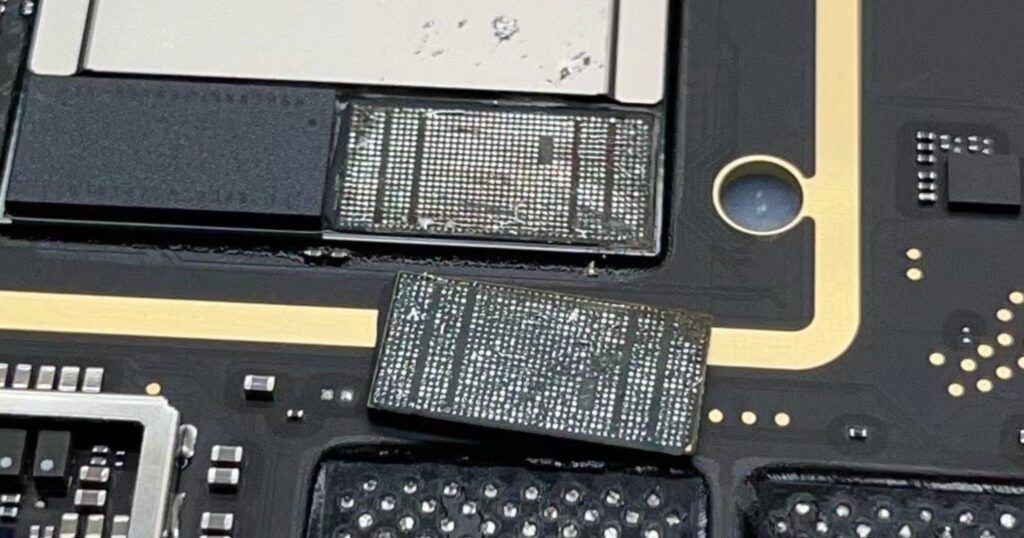
    If you’re brave (and/or foolish) enough, you can arguably upgrade the RAM and SSD storage in your M1-based Mac.

    Recently, a maintenance engineer in China was able to do exactly this, and while Apple sometimes goes out of its way to make some of its devices notoriously difficult to repair or upgrade on your own, Yang Changshun recently discovered that, while difficult, it’s still possible. They successfully upgraded the SSD and RAM on at least one M1 Mac.

    Images show the SSD and RAM modules being soldered through and removed, as well as a screenshot of the upgraded storage in macOS. As with any hardware DIY, there are caveats, but any interested person or company now know that it’s at least possible to perform Mac upgrades.

    Please be careful out there and if you’ve successfully upgraded your M1-based Mac, please let us know about your experience in the comments.

    Via The Mac Observer and chongdiantou

  • Apple launches three year extended repair program for first-gen iPad Pro Smart Keyboard units

    If your first-gen iPad Pro Smart Keyboard is acting up, Apple’s recently-launched three year extended repair program might be there to help.

    Users with a Smart Keyboard for first-gen 9.7- and 12.9-inch Pros can can get repairs or replacements for free, so long the accessory is suffering from one of several specific issues. These include sensor and magnetic connector problems, keys sticking, repeating, or being unresponsive, and trouble with data connections.

    While the Smart Keyboard is normally covered by a single-year warranty, this has likely expired for many users.

    (more…)

  • Users Reporting Dropped Internet Connections During Time Capsule Backups

    timecapsule.jpg
    In the category of “it should be working perfectly forever but isn’t”, a number of users have reported that their Time Capsule units are dropping Internet connections during the backup process. According to MacFixIt, the AirPort Utility does not see the Time Capsule during the dropped out period. Even so, the backup continues and completes despite the Internet connection not working. Time Capsules may also be dropping Internet connections more frequently than during backup sessions as multiple users report anywhere from 5 minute to 30-minute increments between drops.
    One user, identified as “Zzooomm”, described the situation as follows:

    “Time Capsule V7.4.1 loses Internet/Wireless Connection with my MacBookPro2,2 Core 2 Duo 10.5.6 during backup. It appears the backup continues successfully. Opening Airport Utility shows my second Airport Extreme but not the Time Capsule. Within 10 minutes of completing the backup, the TC reappears. Suggestions?”

    Strangely enough and on an apparently-unrelated note, Apple has acknowledged that the Real Player Downloader has been causing communications complications between airport cards and Time Capsules. To repair this, head over to System Preferences, Accounts, Login Items, highlight the RP Downloader and click the (-) button. This is a solution that many of the users on the discussion threads acknowledge solves the issue.
    If you do not have the Real Player Downloader installed and are still having problems, be sure you have Apple’s latest update to the Time Capsule firmware, 7.4.1. If you do not have it, download the update from Apple and install it.
    If you have the firmware updated and do not have Real Player Downloader installed and are still having issues, try resetting your Time Capsule following instructions in the User’s Manual or read this Apple Knowledge Base article.
    If you’ve seen this issue on your end or have an opinion to offer on it, let us know in the comments or forums.

    (more…)