Tag: Game Mode

  • WWDC: Apple announces iOS 18, highlights Home Screen customization, Dark Mode, Game Mode, and other features

    WWDC: Apple announces iOS 18, highlights Home Screen customization, Dark Mode, Game Mode, and other features

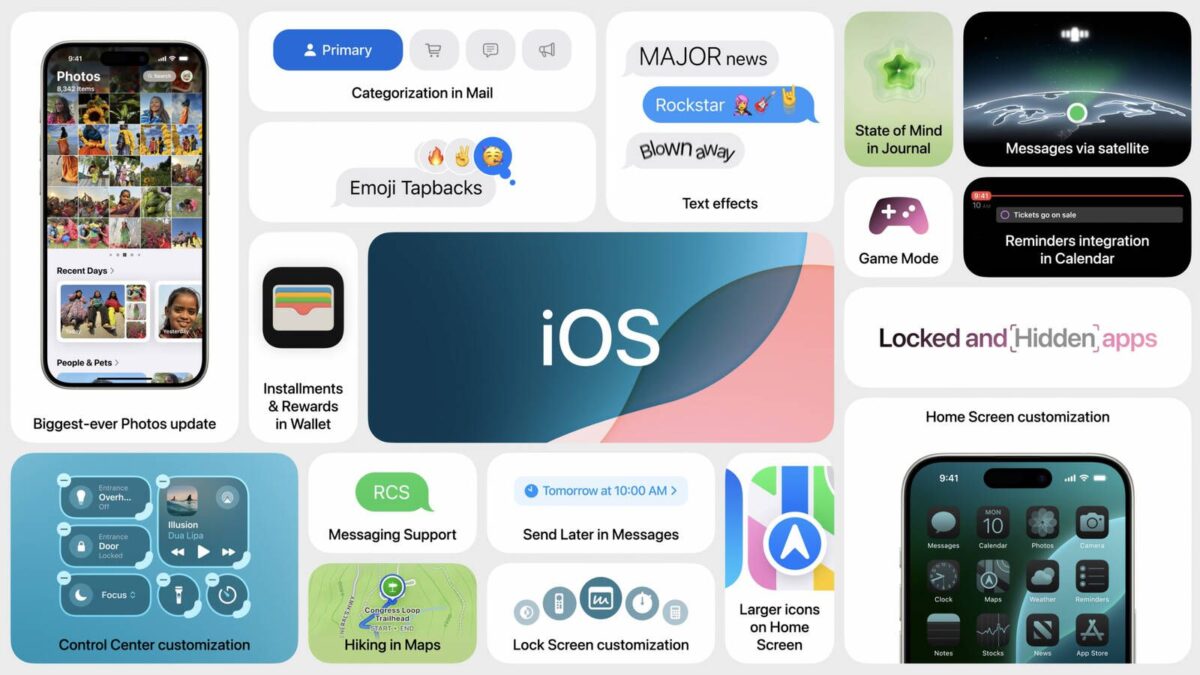
    Monday’s keynote speech at WWDC marked a fair amount to come, complete with Apple previewing its iOS 18 update for its iPhone.

    The forthcoming operating system offers new customization tools for the Home Screen, including Dark Mode, which can use a color tint to create a personalized look. Apps can also now be placed anywhere on the ‌Home Screen‌ freely.

    Apple is also looking to update the Control Center, allowing for new widget-like components to be installed. Via the update, users will be able to continuously swipe to access Control Center screen categories, and Lock Screen controls can also be customized.

    Where Messages is concerned, Apple is looking to expand tapback reactions with any emoji. Users will be able to schedule messages to send later, as well as use text formatting options such as bold, italicization, underlining, and strikethrough. Users can also now send and receive messages with satellite connectivity.

    The Mail app will automatically sort messages into categories to help with organization and prioritization. The Maps app will offer access to topographical maps that correspond with trail networks and hiking routes, and over in Wallet, a new Tap to Cash feature sends cash by holding iPhones together.

    The Photos app is receiving a significant overhaul and will offer new user interface options such as a single view, with a photo grid at the top that views the entire library and collections organized by theme below. Users can use Months and Years views at the bottom. This will also correspond with a filter button that allows you to hide screenshots and sort them in other ways. Other filters include topics like Time, People, Memories, Trips, and more.

    In an interesting move, users will be able to lock apps with authentication, hiding the data from Search and Siri.

    iOS 18 will also offer support for the RCS messaging protocol, bringing it closer in line with Google’s Android protocols, which other new changes include larger Home Screen‌ icons, Reminders integration in Calendar, and Game Mode will be available for the first time on iPhone, minimizing background activity to keep frame rates high, plus more responsive connections to AirPods and wireless game controllers.

    The first developer beta of iOS 18 became available on Monday, a public beta is expected for July, and an official public release is expected in the fall.

    Stay tuned for additional details as they become available.

    Via MacRumors and developer.apple.com

  • Apple addresses its future role in high-end gaming, highlights recent hardware and software-based improvements

    Apple addresses its future role in high-end gaming, highlights recent hardware and software-based improvements

    If you’re a fan of gaming on the Mac, you’re going to like this.

    Inverse’s Raymond Wong on Thursday published an in-depth overview of Apple’s increasing push towards high-end gaming on the macOS platform. the story includes interviews with Apple marketing managers Gordon Keppel and Leland Martin.

    Among the biggest reasons that high-end gaming has improved on the Mac in recent years is the transition from Intel processors to Apple silicon, allowing for improved performance-per-watt. The new M3, M3 Pro, and M3 Max chips for the Mac feature hardware-accelerated ray tracing and mesh shading for improved graphics rendering, which is especially beneficial for high-end AAA games.

    “Now, every Mac that ships with Apple silicon can play AAA games pretty fantastically,” said Keppel. “Apple silicon has been transformative of our mainstream systems that got tremendous boosts in graphics with M1, M2, and now with M3.”

    Where the iPhone and iPad are concerned, the development process has also been simplified:

    “If you look at the Mac lineup just a few years ago, there was a mix of both integrated and discrete GPUs,” said Martin. “That can add complexity when you’re developing games. Because you have multiple different hardware permutations to consider. Today, we’ve effectively eliminated that completely with Apple silicon, creating a unified gaming platform now across iPhone, iPad, and Mac. Once a game is designed for one platform, it’s a straightforward process to bring it to the other two. We’re seeing this play out with games like Resident Evil Village that launched first [on Mac] followed by iPhone and iPad.”

    Another new technology built into the M3 chip family is Dynamic Caching, which allows the GPU to allocate memory usage in real-time. Apple has stated that this capability “dramatically increases GPU utilization and performance” for demanding apps and games.

    On the software side, macOS Sonoma offers a new Game Mode feature that temporarily prioritizes CPU and GPU performance for gaming. Game Mode also lowers AirPods audio latency, and reduces input latency with popular third-party game controllers by doubling the Bluetooth sampling rate.

    Earlier this year, Apple released a new toolkit to the developer community that makes it easier to port Windows games to the Mac. The toolkit provides an emulation environment that allows developers to run their existing, unmodified Windows game on the Mac and quickly evaluate how well the game could run on macOS before writing any code.

    “We’ve definitely seen interest from developers and publishers like Kojima Productions and Annapurna Interactive Games on how to take advantage of both parts of the Game Porting Toolkit,” Martin said. “When you download the toolkit, there’s really two parts to it. There’s that emulation environment and that’s helped demonstrate today’s game — you drop in an existing Windows game and see how well it could run on the Mac. The second part is the Metal shader converter and that’s there to help developers convert their tens of thousands of shader code into Metal. And they’ve praised how incredibly useful this is and how it’s saved them a bunch of time in their development timeline.”

    Several AAA/high-profile games launched for the Mac this year, including a Resident Evil 4 remake, Resident Evil Village, Stray, and Baldur’s Gate 3. Death Stranding Director’s Cut and Assassin’s Creed Mirage are also expected to launch on the Mac in 2024.

    Stay tuned for additional details as they become available.

    Via MacRumors and Inverse

  • Apple support document explains how macOS Sonoma’s Game Mode functions

    Apple support document explains how macOS Sonoma’s Game Mode functions

    If you snagged macOS Sonoma a few days ago, you may have been eager to try the operating system’s new Game Mode feature, which prioritizes CPU and GPU performance for games. Apple on Tuesday offered the following support document offering additional information as to how to use the feature:

    Game Mode optimizes your gaming experience by giving your game the highest priority access to your CPU and GPU, lowering usage for background tasks. And it doubles the Bluetooth sampling rate, which reduces input latency and audio latency for wireless accessories like game controllers and AirPods.

    Game Mode requires a Mac with Apple Silicon. Here’s how to turn it on in ‌macOS Sonoma‌:

    How to Turn on Game Mode:

    Game Mode turns on automatically when you use these steps to view your game in full screen:

    Move your pointer over the green button in the upper-left corner of the game window.
    Choose Enter Full Screen from the menu that appears.
    When you enter full screen in this way, a Game mode menu appears in the menu bar. You can use this menu to confirm that Game mode is turned on for your game.

    How to Turn Off Game Mode:

    Game Mode turns off automatically when you stop viewing your game in full screen, but you can also turn it off while your game is still in full screen mode: From the Game Mode menu in the menu bar, choose Turn Game Mode off. Note that Game Mode will remain off for the game you were playing until you turn it on again, even if you quit and reopen the game.

    If you’ve tried the Game Mode feature in macOS Sonoma, please let us know about your experience in the comments.

    Via MacRumors and support.apple.com

  • Apple releases macOS Sonoma operating system

    Apple releases macOS Sonoma operating system

    You’ve been waiting for it and it’s here.

    Apple on Tuesday released macOS 14 Sonoma, the newest version of its operating system for the Mac.

    macOS Sonoma has been in beta testing for several months, and it is compatible with the 2019 and later iMac, the ‌iMac‌ Pro, the 2018 and later Mac mini, the 2018 and later MacBook Pro, the 2019 and later Mac Pro, and the Mac Studio.

    The new operating system offers the following range of new features, fixes, and changes, among others:

    Screen Savers:
    Stunning screen savers of locations from around the world seamlessly become your desktop wallpaper when you log in

    • Shuffle settings for rotating through screensavers by theme including Landscape, Cityscape, Underwater, and Earth

    Widgets:

    • Widgets can be placed anywhere on the desktop and adapt to the color of your wallpaper while working in apps
    • iPhone widgets can be added to your Mac when your iPhone is nearby or on the same Wi-Fi network
    • Interactive widgets let you take actions directly from the widget such as running a shortcut, pausing media, and more

    Video Conferencing:

    • Presenter Overlay keeps you front and center while sharing your screen in FaceTime or third-party video conferencing apps (Mac with Apple Silicon)
    • Reactions layer 3D effects like hearts, balloons, confetti, and more around you in video calls and can be triggered with gestures (Mac with Apple silicon, Continuity Camera with iPhone 12 and later)

    Safari and Passwords:

    • Profiles keep your browsing separate for topics like work and personal, separating your history, cookies, extensions, Tab Groups, and favorites
    • Web apps let you use any website like an app, complete with an icon in the Dock for faster access and a simplified toolbar for easier browsing
    • Enhanced Private Browsing locks your private browsing windows when you’re not using them, blocks known trackers from loading, and removes tracking that identifies you from URLs
    • Password and passkey sharing allows you to easily share accounts with trusted contacts

    Messages:

    • Live Stickers sync from iOS and iPadOS to macOS, giving you access to the Live Stickers you create on your iPhone and iPad
    • Search filters for people, keywords, and content types like photos or links help you more easily find what you are looking for
    • Swipe to reply inline on any iMessage bubble

    Gaming:

    • Game Mode gives games the highest priority on the CPU and GPU, delivering more consistent frame rates and lower latency to wireless controllers and AirPods (Mac with Apple silicon)

    Keyboard:

    • Improved autocorrect accuracy makes typing even easier by leveraging a more powerful transformer-based language model
    • Inline predictive text shows single- and multi-word predictions that you can add by pressing the Space bar
    • Improved Dictation experience supports using your voice and keyboard together to enter and edit text

    AirPods:

    • Adaptive Audio delivers a new listening mode that dynamically blends Active Noise Cancellation and Transparency to tailor the noise control experience based on the conditions of your environment (AirPods Pro (2nd generation) with the latest firmware)
    • Personalized Volume adjusts the volume of your media in response to your environment and listening preferences over time (AirPods Pro (2nd generation) with the latest firmware)
    • Conversation Awareness lowers your media volume and enhances the voices of the people in front of the user, all while reducing background noise (AirPods Pro (2nd generation) with the latest firmware)
    • Press to mute and unmute your microphone by pressing the AirPods stem or the Digital Crown on AirPods Max when on a call (AirPods (3rd generation), AirPods Pro (1st and 2nd generation), or AirPods Max with the latest firmware)
    • Improved AirPods automatic switching now detects Mac up to 2X faster (AirPods (2nd and 3rd generation), AirPods Pro (1st and 2nd generation), AirPods Max with the latest firmware)

    Privacy:

    • Sensitive Content Warnings can be enabled to help prevent users from unexpectedly viewing sensitive images in Messages
    • Expanded Communication Safety protections for children now detect videos containing nudity in addition to photos shared through Messages and the system Photos picker
    • Improved sharing permissions let you choose which photos to share and add calendar events without providing access to your entire photo library or calendar

    Accessibility:

    • Live Speech lets you type what you want to say and reads it aloud in FaceTime calls or in-person conversations
    • Personal Voice helps users at risk of speech loss create a voice that sounds like them in a private and secure way using on-device machine learning
    • Made for iPhone-compatible hearing devices can be paired and used with Mac (MacBook Pro (2021), Mac Studio (2022), and Mac computers with M2 chip)

    This release also includes other features and improvements:

    • One-Time verification code AutoFill from Mail helps you quickly sign into sites in Safari, without leaving the browser
    • Inline PDFs and document scans in Notes are presented full-width making them easy to view
    • Grocery Lists in Reminders automatically group related items into sections as you add them
    • Visual Look Up for recipes helps you find similar dishes from photo
    • Visual Look Up in video helps you learn about objects that appear in paused video frames
    • Pets in the People album in Photos surfaces individual pets just like friends or family members
    • Option to say “Siri” in addition to “Hey Siri” for a more natural way to activate Siri (Mac with Apple silicon, AirPods Pro (2nd generation))
    • High-performance mode in Screen Sharing supports color workflows and improves responsiveness while remotely accessing a Mac (Mac with Apple silicon)
    • Item sharing in Find My allows you to share an AirTag with up to five other people
    • Activity History in Home displays a recent history of events for door locks, garage doors, security systems, and contact sensors
    • Battery health management updated on 13-inch MacBook Air with M2 chip to better optimize long-term battery health

    The ‌‌macOS Sonoma‌ update can be downloaded for free on all eligible Macs using the Software Update section of System Settings.

    Some features may not be available for all regions or on all Apple devices.

    If you’ve had a chance to try the macOS Sonoma operating system, either in beta, or through its official release, please let us know about your experience in the comments.

    Via MacRumors

  • Apple to release macOS Sonoma on Tuesday, September 26

    Apple to release macOS Sonoma on Tuesday, September 26

    If you’ve been hankering for Apple’s macOS Sonoma operating system upgrade, it arrives tomorrow.

    The company previously announced that the operating system would be released on Tuesday, September 26.

    Here are some of the new features, changes, and fixes you can expect from it:

    Desktop Widgets:

    macOS Sonoma Widgets
    macOS Sonoma brings widgets to the desktop on the Mac, and they are now fully interactive like on the iPhone. It is even possible to use widgets from your iPhone apps automatically, without having to install the corresponding Mac apps.

    Game Mode:

    macOS Sonoma features a new Game Mode that temporarily prioritizes CPU and GPU performance for gaming on Apple silicon Macs. Game Mode also reduces audio latency for AirPods and input latency for select game controllers connected via Bluetooth.

    Web Apps in Dock:

    On macOS Sonoma, any website can be added to the Dock as a web app for convenient access. To create a web app, load the website in Safari, open the File menu, and select Add to Dock. Web apps offer a simplified toolbar and support push notifications.

    New Screen Savers and Wallpapers:

    macOS Sonoma adds new Apple TV-like aerial screen savers that feature slow-motion videos of places around the world, such as Yosemite National Park and Dubai. Each screen saver can transition to a matching desktop wallpaper.

    Safari Profiles:

    The latest version of Safari introduced support for profiles, allowing you to keep your browsing separate for work, personal life, and more. Apple says each profile has separate history, cookies, extensions, Tab Groups, and favorites.

    macOS Sonoma is compatible with the following Macs:

    • MacBook Pro: 2018 and later
    • MacBook Air: 2018 and later
    • Mac mini: 2018 and later
    • iMac: 2019 and later
    • iMac Pro: 2017
    • Mac Studio: 2022 and later
    • Mac Pro: 2019 and later

    Other new features include the following:

    Screen Savers:

    • Stunning screen savers of locations from around the world seamlessly become your desktop wallpaper when you log-in
    • Shuffle settings for rotating through screensavers by theme including Landscape, Cityscape, Underwater, and Earth

    Widgets:

    • Widgets can be placed anywhere on the desktop and adapt to the color of your wallpaper while working in apps
    • iPhone widgets can be added to your Mac when your iPhone is nearby or on the same Wi-Fi network
    • Interactive widgets let you take actions directly from the widget such as running a shortcut, pausing media, and more

    Video Conferencing:

    • Presenter Overlay keeps you front and center while sharing your screen in FaceTime or third-party video conferencing apps (Mac with Apple silicon)
    • Reactions layer 3D effects like hearts, balloons, confetti, and more around you in video calls and can be triggered with gestures (Mac with Apple silicon, Continuity Camera with iPhone 12 and later)

    Safari and Passwords:

    • Profiles keep your browsing separate for topics like work and personal, separating your history, cookies, extensions, Tab Groups, and favorites
    • Web apps let you use any website like an app, complete with an icon in the Dock for faster access and a simplified toolbar for easier browsing
    • Enhanced Private Browsing locks your private browsing windows when you’re not using them, blocks known trackers from loading, and removes tracking that identifies you from URLs
    • Password and passkey sharing allows you to easily share accounts with trusted contacts

    Messages:

    • Live Stickers sync from iOS and iPadOS to macOS, giving you access to the Live Stickers you create on your iPhone and iPad
    • Search filters for people, keywords, and content types like photos or links help you more easily find what you are looking for
    • Swipe to reply inline on any iMessage bubble

    Gaming:

    • Game Mode gives games the highest priority on the CPU and GPU, delivering more consistent frame rates and lower latency to wireless controllers and AirPods (Mac with Apple silicon)

    Keyboard:

    • Improved autocorrect accuracy makes typing even easier by leveraging a more powerful transformer-based language model
    • Inline predictive text shows single- and multi-word predictions that you can add by pressing the Space bar
    • Improved Dictation experience supports using your voice and keyboard together to enter and edit text

    AirPods:

    • Adaptive Audio delivers a new listening mode that dynamically blends Active Noise Cancellation and Transparency to tailor the noise control experience based on the conditions of your environment (AirPods Pro (2nd generation) with the latest firmware)
    • Personalized Volume adjusts the volume of your media in response to your environment and listening preferences over time (AirPods Pro (2nd generation) with the latest firmware)
    • Conversation Awareness lowers your media volume and enhances the voices of the people in front of the user, all while reducing background noise (AirPods Pro (2nd generation) with the latest firmware)
    • Press to mute and unmute your microphone by pressing the AirPods stem or the Digital Crown on AirPods Max when on a call (AirPods (3rd generation), AirPods Pro (1st and 2nd generation), or AirPods Max with the latest firmware)
    • Improved AirPods automatic switching now detects Mac up to 2X faster (AirPods (2nd and 3rd generation), AirPods Pro (1st and 2nd generation), AirPods Max with the latest firmware)

    Privacy:

    • Sensitive Content Warnings can be enabled to help prevent users from unexpectedly viewing sensitive images in Messages
    • Expanded Communication Safety protections for children now detect videos containing nudity in addition to photos shared through Messages and the system Photos picker
    • Improved sharing permissions let you choose which photos to share and add calendar events without providing access to your entire photo library or calendar

    Accessibility:

    • Live Speech lets you type what you want to say and reads it aloud in FaceTime calls or in-person conversations
    • Personal Voice helps users at risk of speech loss create a voice that sounds like them in a private and secure way using on-device machine learning
    • Made for iPhone compatible hearing devices can be paired and used with Mac (MacBook Pro (2021), Mac Studio (2022), and Mac computers with M2 chip)

    This release also includes other features and improvements:

    • One-Time verification code AutoFill from Mail helps you quickly sign into sites in Safari, without leaving the browser
    • Inline PDFs and document scans in Notes are presented full-width making them easy to view
    • Grocery Lists in Reminders automatically group related items into sections as you add them
    • Visual Look Up for recipes helps you find similar dishes from photo
    • Visual Look Up in video helps you learn about objects that appear in paused video frames
    • Pets in the People album in Photos surfaces individual pets just like friends or family members
    • Option to say “Siri” in addition to “Hey Siri” for a more natural way to activate Siri (Mac with Apple silicon, AirPods Pro (2nd generation))
    • High performance mode in Screen Sharing supports color workflows and improves responsiveness while remotely accessing a Mac (Mac with Apple silicon)
    • Item sharing in Find My allows you to share an AirTag with up to five other people
    • Activity History in Home displays a recent history of events for door locks, garage doors, security systems, and contact sensors
    • Battery health management updated on 13-inch MacBook Air with M2 chip to better optimize long term battery health

    Some features may not be available for all regions or on all Apple devices.

    MacOS Sonoma is expected to be released sometime around 10 AM Pacific Time/1 PM Eastern Time on Tuesday. Once the update is available, it can be installed from the System Settings app under General → Software Update.

    If you get a chance to install it early, please let us know about your experience with it in the comments.

    Via MacRumors