Tag: slider

  • macOS Tahoe 26.4 beta hints at much-anticipated battery charge limit feature

    macOS Tahoe 26.4 beta hints at much-anticipated battery charge limit feature

    This is going to come in handy.

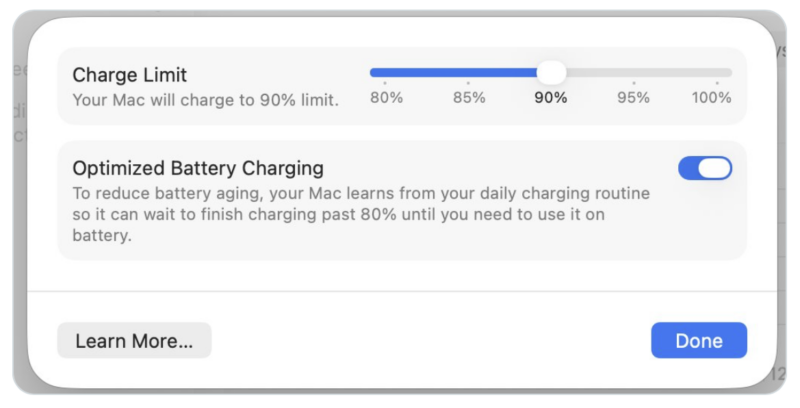
    Following up on the macOS Tahoe 26.4 beta Apple released to the developer community on Monday, the company has finally added the ability to set the charge limit for the battery in a MacBook. With the new slider, you can set the limit to 80 percent, to 100 percent, or to an increment (in fives) in between.

    The feature, dubbed “Optimize Battery Charging” under macOS Catalina, uses machine learning to limit charging. With the forthcoming update, users can manually set the charge limit to below 100 percent. This feature had been present in iPhone since iOS 18, and is now en route for the Mac.

    This is important given that every time you charge and deplete the battery, it puts wear and tear on it, and over time, the battery carries less of a charge than it used to. Charging to 100 percent and depleting completely accelerates this process. The lower the upper limit you can manage, the better this is for the health of the battery.

    Stay tuned for additional details as they become available.

    Via Macworld

  • Apple distributes iOS 26.2 Release Candidate build as both a public beta and a developer beta

    Apple distributes iOS 26.2 Release Candidate build as both a public beta and a developer beta

    Just a day after the public release of its iOS 26.1 update, Apple released the first iOS 26.2 beta. Now in the Release Candidate stage, and thought to be released on December 8 or 9, the update is expected to feature the following according to Macworld’s Jason Cross:

    AirDrop code: A new section in the AirDrop Settings allows you to “Manage Known AirDrop Contacts” and specifies that you’ll appear for 30 days for those you have shared a one-time code with. There does not appear to be a way to generate such codes yet, though.

    Measure app: The Measure app gets a new Liquid Glass design.

    Games app: New library filtering, improved controller navigation, and challenge scores that update in real time.

    Updated Sleep Score ranges: Apple has adjusted what the various Sleep Score ranges mean, making it require higher scores for the better descriptions. For example, “High” used to be a score of 70-89, and is now 81-95.

    Lock Screen Liquid Glass slider: The clock control for the Lock Screen how has a slider to adjust how transparent/glassy the time readout should be. This replaces the old “clear or tinted” toggle.

    Apple News design: The design of Apple News has been tweaked, with four quick-select categories at the top. These appear to be based on your previous activity.

    Podcasts improvements: The Podcasts app gets auto-generated chapters along with the ability to more easily follow mentioned podcasts or follow up on links mentioned in a podcast episode.

    A.I. Search: Set Alarms and Timers for Reminders: If you set a reminder as “urgent” you will be asked if you wish to create an alarm or timer for it.

    Freeform app: You can now insert tables into your boards.

    The Release Candidate is available both as a public beta and a developer beta.

    If you’d like to test the iOS 26.2 beta but are not a registered Apple developer, follow these steps:

    iOS 26.2: How to install

    • Click Sign Up on the Apple Beta page and register with your Apple ID.
    • Log in to the Beta Software Program.
    • Click Enroll your iOS device.
    • Open the Settings app, tap General, then Software Update.
    • In the Beta Updates section, select the iOS Public Beta.
    • It may take a few moments after registering for the beta option to appear in Software Update.

    If you’re registered as an Apple developer, or want to create a free developer account to test the iOS 26.2 beta, you can create the account in Xcode or use the Apple Developer app in iOS.

    Here’s how to install the beta through the Apple Developer app:

    • Download the Apple Developer App from the App Store.
    • Open the app.
    • Tap on Account.
    • Sign in using your usual Apple ID.

    If you’ve had a chance to try the beta, please let us know about your experience in the comments.

    Via Macworld, beta.apple.com, and developer.apple.com

  • Apple releases iOS 13.1 developer beta 1

    Albeit the official release of iOS 12 is still weeks away, Apple has begun beta testing iOS 13.1 within its developer community. This is a highly unusual move, especially given that this is a point release being externally tested before the prior version is finished.

    This first major update to iOS 13 will bring several features that appear not to be in the initial iOS 13 release. The early timing makes us think that iOS 13.1 will be release relatively quickly after iOS 13, perhaps even by late September when the new iPhones are expected to release.

    According to initial reports, the following new features could be found in iOS 13.1 that won’t be seen in the initial iOS 13 release:

    Shortcuts Automations: This functions as an upgrade to the Shortcuts feature in iOS. Automations allows your Shortcuts to run automatically once certain conditions are met, as opposed to triggering them manually. For example, a workout playlist can begin when you start a workout on your Apple Watch, or turn on all your lights when you arrive home, all hands-free. 

    Share ETA in Maps: Estimated times of arrival can be shared with your contacts via Maps.

    Dynamic Wallpapers: Dynamic Wallpapers feature new colors and designs, and are also available on more devices.

    Volume slider icons: The new volume slider shows icons of the type of device connected, such as AirPods, Powerbeats Pro, or HomePod.

    HomeKit icons: HomeKit icons are new, and feature more detailed icons for your HomeKit devices.

    iOS 13.1 is expected around the end of October, and the first external beta tests usually begin around mid-September, the time the official release. Users could also see iOS 13.1 release early in October, or possibly even late September, around the time when we expect the new iPhones to ship to customers and stores.

    Via Macworld

  • Matias offers wired Mac keyboard following Apple’s discontinuation of product

    Much to a number of users’ chagrin, Apple discontinued its wired keyboard last June, introducing a new version of the Magic Keyboard with a number pad to take its place. Where Apple left its market open, Matias has introduced a wired keyboard similar to Apple’s discontinued model with RGB backlighting.

    Matias’ keyboards feature an extremely similar look and feel to Apple’s designs, the keys and materials all near-replicas of Apple’s keyboard. The only notable addition is a slider on the back that allows users to rotate through a variety of colors, and a function key that lets you adjust brightness by holding it down and pressing a number on the keypad.

    (more…)

  • Adobe releases Photoshop CS 6 13.0.5 update

    adobelogo

    A decent update goes a long way.

    On Wednesday, Adobe released version 13.0.5 of its Photoshop CS6 image editing program. The new version, a 135.5 megabyte download (via MacUpdate), offers the following fixes and changes:
    – When a transformed type layer’s point size is changed, the end result should be as if there was no transform (like CS5).

    – When moving a type layer with a free transform active, the size of the font changes to non-integer values.

    – Clicking a Pop-up window in a Flash extension panel does not work and/or cause Photoshop to crash.

    – Info panel displays incorrect value for adjustment layers inside groups.

    – Restore View>Print Size menu command and Zoom tool right-click context menu.

    – Legacy actions fail due to layer merge naming change.

    – Black-and-White adjustment layer scrubby slider does not work if in a layer group.

    – Arrow keys stop working during text edit using the Type tool.

    – Custom icons for Flash extension panels are not displayed after changing the Interface color theme.

    Photoshop CS6 13.0.5 requires an Intel-based Mac running Mac OS X 10.6.8 or later to install and run.

    If you’ve tried the new version and have any feedback to offer, please let us know in the comments.